Tasks handled by Kimi K3 include:
- Writing a blog post detailing website changes since 14 Jun 2026, comparing old/new designs using screenshots.
- Explain the new “Teenage Engineering industrial hardware” design philosophy.
- Highlight easter eggs: FPS counter and battery charging detection.
- Emphasize the site redesign is fully driven using oh-my-pi, Gemini 3.5 Flash, Gemini 3.1 Pro, and Kimi K3.
The web has become overly rounded, heavily gradiented, and increasingly homogeneous. In a quest to bring back tactile, technical hardware vibes to the browser, I recently embarked on a complete redesign of my portfolio site. Under the hood, this overhaul meant a full framework migration to Svelte 5 and SvelteKit 2. Visually, it represents a pivot to a hardware-inspired, industrial design aesthetic.
Here is a look at what changed, how it works, and the AI stack that powered the transition.
The Philosophy: Teenage Engineering Industrial Hardware
The core design philosophy behind the overhaul draws heavily from the raw, high-contrast, mechanical interfaces popularized by Teenage Engineering (think the OP-1 or Pocket Operators).
We threw out the legacy blue radial gradients and soft rounded corners. In their place:
- Precision Containment: High-contrast monochromatic borders and grid alignments.
- Structured Typography: Monospace labeling, strict uppercase headers, and compartmentalized metadata fields.
- Technical Widgets: A virtual hardware device (the “PO-100 OP-ENGINE” portrait module) on the homepage that controls the interactive aspects of the site.
Visual Comparison: Old vs. New
The visual differences are striking.
The Homepage
The old homepage featured a classic dark gradient background with simple layout lines. The new layout is structured like a hardware spec sheet, complete with location tracking data, an interactive console block, and clean, boxy borders.
| Old Homepage | New Homepage |
|---|---|
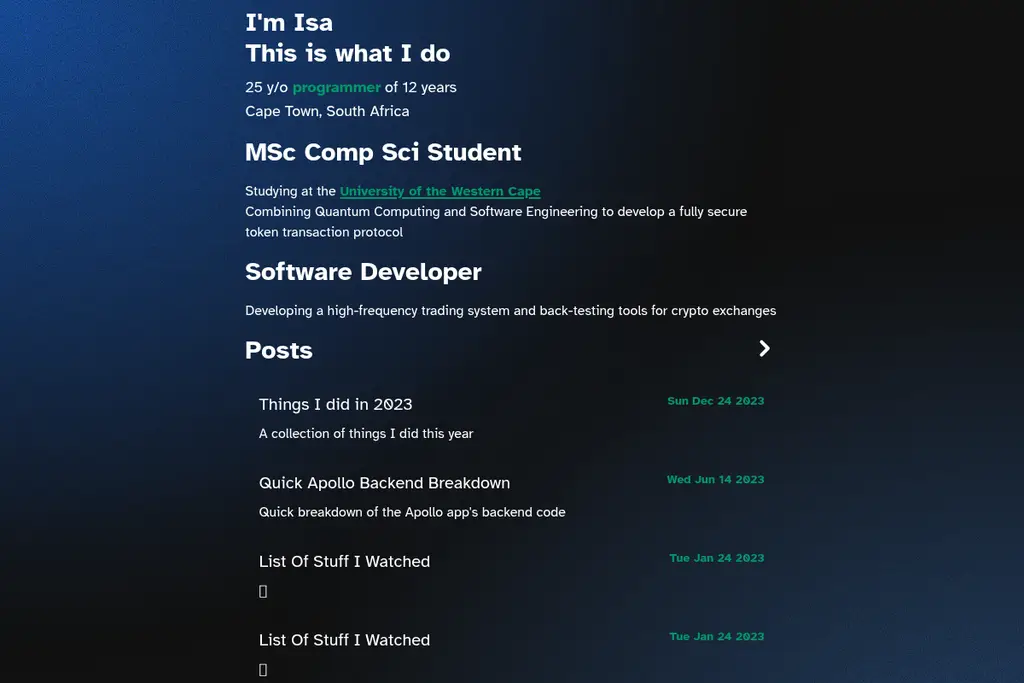 | 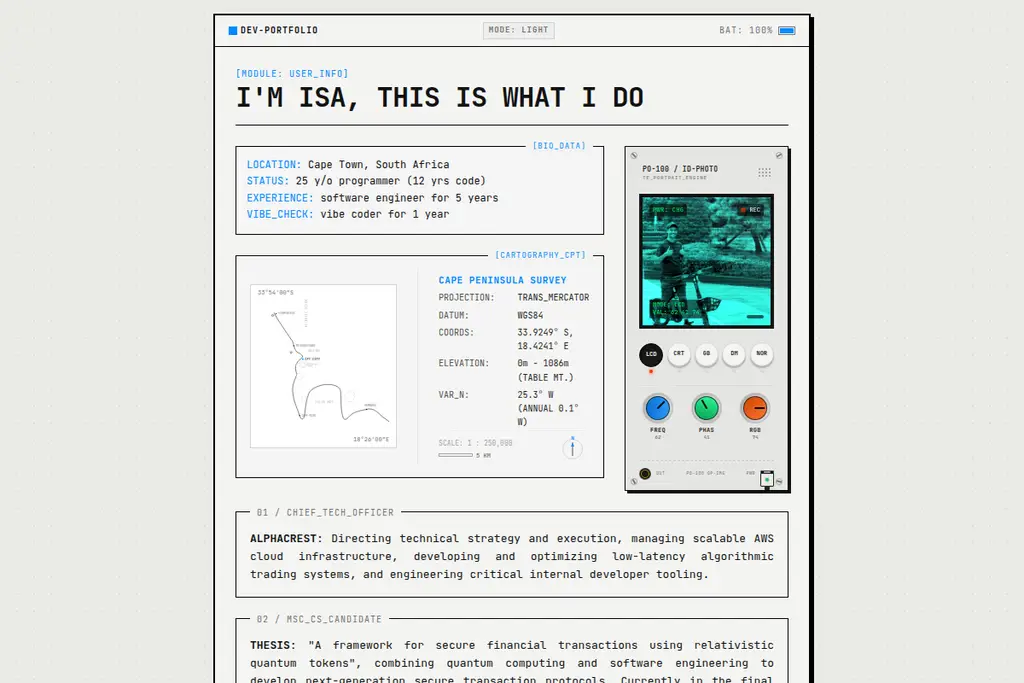 |
Dynamic Lists & Interactive Rows
Even the list layout received a massive upgrade. The old posts and project listings were simple list links divided by horizontal rules. In the new interface, components like the Movies list are structured as technical table rows with expandable dropdown cards that embed interactive elements (like Spotify tracks and detailed commentary) inside a custom compartment.
| Old Lists | New Expandable Lists |
|---|---|
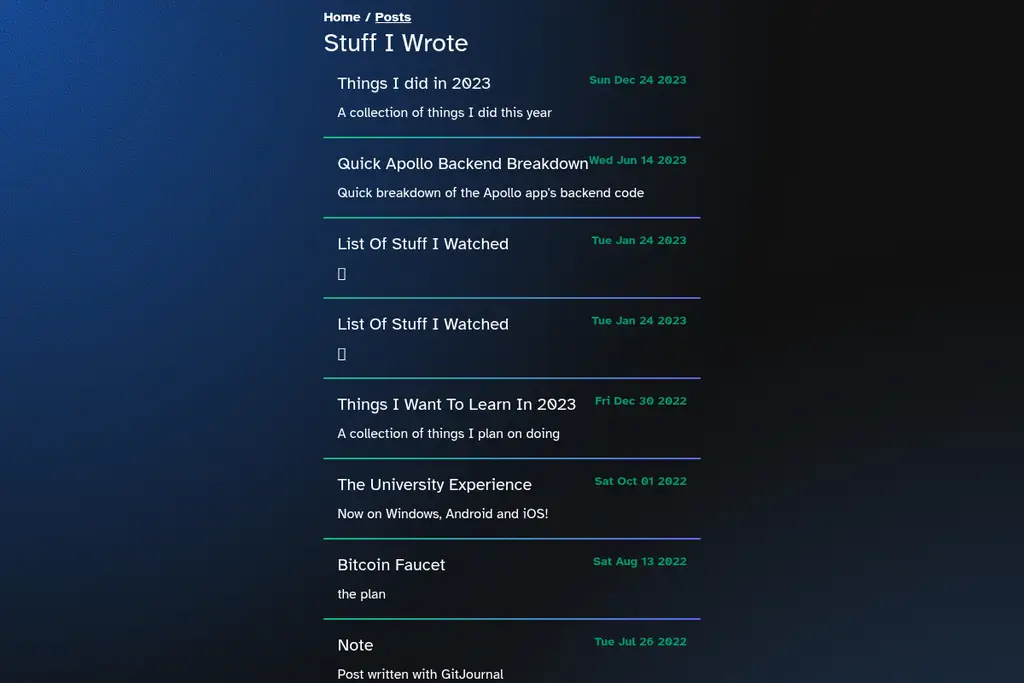 | 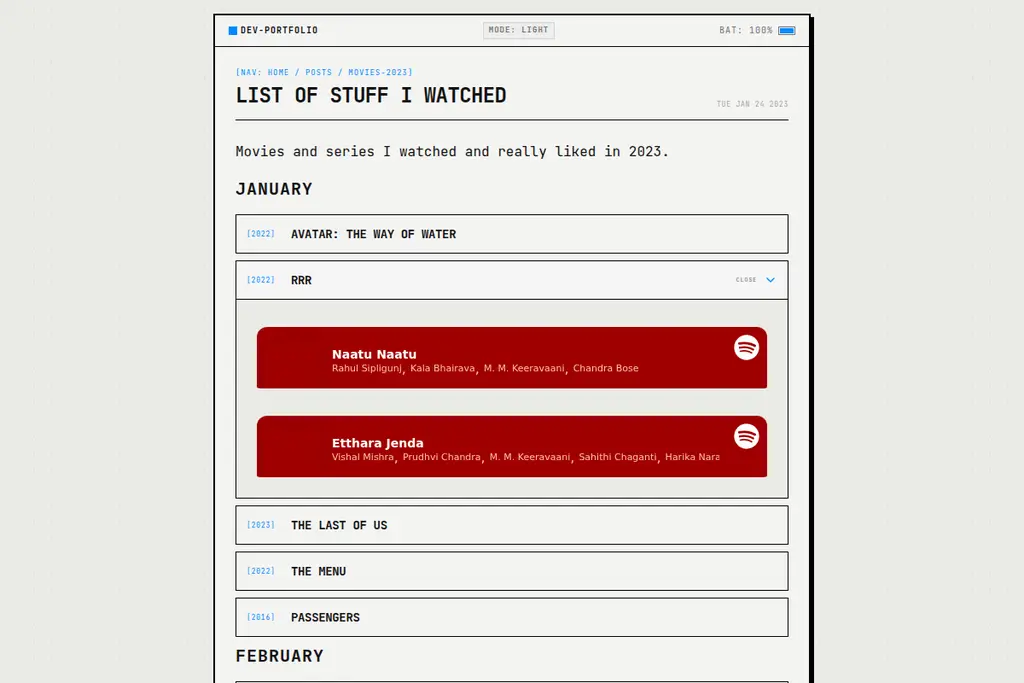 |
Svelte 5 Runes & Snippets
A visual change is only as good as its underlying structure. Migrating the codebase to Svelte 5 allowed us to leverage the power of Runes and Snippets for reactivity and layout composition.
Instead of traditional $: declarations and helper-heavy property passing, Svelte 5’s new $state and $effect runes manage the application state cleanly. For instance, the live FPS display uses Svelte 5 state reactivity to capture the frame rate:
let fps = $state<number>(60);Deep Dive: The Easter Eggs
I’ve wired two interactive elements directly into the site’s top status bar as Easter eggs: a live FPS counter and a battery charging state detector.
1. Live FPS Counter
The FPS counter provides real-time tracking of rendering performance. Rather than using legacy tracking timers, it runs a high-resolution render loop using requestAnimationFrame inside the layout’s mounting phase:
// Inside onMount of src/routes/+layout.svelte
let lastTime: number | null = null;
let frameCount = 0;
let animationFrameId: number;

function updateFps(timestamp: number) {
    if (lastTime === null) lastTime = timestamp;
    frameCount++;
    if (timestamp >= lastTime + 1000) {
        fps = Math.round((frameCount * 1000) / (timestamp - lastTime));
        frameCount = 0;
        lastTime = timestamp;
    }
    animationFrameId = window.requestAnimationFrame(updateFps);
}

animationFrameId = window.requestAnimationFrame(updateFps);

return () => {
    window.cancelAnimationFrame(animationFrameId);
};
2. Battery Status & High-Voltage Charging Marquee
The battery indicator reads the hardware’s battery level and charging status via the navigator.getBattery() API. The battery state is managed globally using Svelte stores:
// src/lib/stores/battery.ts
import { writable } from 'svelte/store';

export const isCharging = writable(false);
export const batteryLevel = writable(100);
export const playLightning = writable(false);
When you plug in your charger, a custom event listener triggers the playLightning state, displaying a high-voltage alert marquee across the top status bar:
⚡ CHARGER_CONNECTED // POWERING_UP // ⚡ ⚡ ⚡Because browsers like Safari and Firefox do not expose the getBattery API due to privacy/fingerprinting concerns, I’ve implemented a manual fallback: clicking the battery percentage icon manually toggles the charging state, allowing anyone to experience the high-voltage charging marquee.
The Engine Room: An AI-Driven Redesign
This redesign wasn’t coded by hand in isolation. The entire migration, layout styling, and easter egg implementation were built using an advanced agentic coding harness—oh-my-pi—orchestrating a collaborative suite of large language models:
- Gemini 3.5 Flash: Handled rapid file updates, component skeleton generation, and formatting.
- Gemini 3.1 Pro: Conducted structural analysis, planned Svelte 5 runes migration, and debugged tricky reactivity loops.
- Kimi K3: Mapped out high-level design constraints and helped align CSS custom properties to ensure clean theme toggling.
This multi-model coordination allowed me to refactor entire layouts, migrate the rendering logic, and implement new stores with confidence in a fraction of the time. The result is a fast, highly customized site built to technical perfection.